
Player Tags
Tags
Produktbeschreibung
🏷️ Player Tags
Show "Admin", "DJ", "Bartender," or anything else you build above a player's head , so anyone can identify staff and special players in your world at a glance.
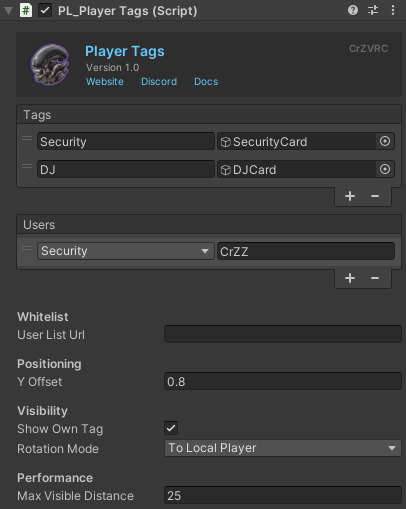
Player Tags is a lightweight tag system for VRChat worlds. Create your own tags, each with its own look, and assign them to players by typing names in the Editor or pulling a list from a remote URL. No scripting or in-world panel needed to set it up.
🎨 Custom tags, your way
- No fixed limit on how many tags a world can define
- Every tag is built around a template - the visual shown above a player's head. You build it yourself (a name plate, an icon, anything you want) like any other in-world UI, with no scripting required. No template is included with the asset; the asset handles positioning, rotation, and visibility, but the look is entirely up to you
📋 Two ways to assign a tag
- 📝 Manual, from the Editor: type a player's VRChat display name and pick which tag it grants, directly in the world's setup
- 🌐 Remote list (optional): pull
PlayerName, TagNamelines from a text file (like a Pastebin), fetched automatically when the world loads. An unrecognized tag name is simply skipped, no errors - Both sources work together as one combined list. A player can be listed either way, or both, and whichever entry is found first is used
📍 Positioning, rotation, visibility & performance
- Height offset: how far above the player's head the tag floats, adjustable per world
- Follows the player's head in real time, including through movement, jumping, and crouching, recalculated continuously rather than only once
- Rotation modes, chosen per world: None (doesn't rotate, only follows head position), With Player (turns with the player but always stays upright), or To Local Player (always turns to face whoever is looking at it, like a sign that follows your eyes — only turns left or right, never tilts up or down, and everyone sees it facing them personally)
- Show Own Tag setting (on by default): decide whether a player can see the tag floating above their own head. Turn it off for something like an "It" tag in a minigame, where everyone else should see it but the wearer shouldn't. A hidden tag is never created for that player, so there's no extra performance cost
- Distant tags stop updating and hide automatically, based on a configurable "Max Visible Distance". A tag reappears the moment you're close enough again, keeping a world with many tagged players running smoothly with zero manual setup.
🔗 Integrates With:
- 🛡️ Security System (optional): a role can be set to automatically show or hide a Player Tag the moment it's granted or revoked. This integration lives entirely on the Security System's side — Player Tags has no idea the Security System exists, and works exactly the same with or without it installed
📌 Good to Know
- No template is included — you build the tag's visual yourself. The asset only handles positioning, rotation, and visibility.
- Tag assignment is fully local per client, with no networking involved.
📚 Documentation & Setup
Detailed instructions for setting up and configuring this asset can be found on the official documentation website.
📜 Terms of Service & Privacy Policy
By purchasing and downloading this asset, you agree to our Terms of Service and Privacy Policy. You can read both full documents on the website.
💬 Support & Communication
All technical support, bug reports, and general communications are handled exclusively through our official Discord server. Join the Discord server here.