
![Yipbold - Kobold conversion for Yip avatar [ Version 1.1 || FT Enabled ]](https://jinxxy-c.jinxxy-cdn.com/cdn-cgi/image/format=auto,onerror=redirect/667e2046-3d4f-549c-ac30-032cd529fbe3/3969604613165811598/1021841339487746048.png)
![Yipbold - Kobold conversion for Yip avatar [ Version 1.1 || FT Enabled ]](https://jinxxy-c.jinxxy-cdn.com/cdn-cgi/image/format=auto,onerror=redirect/667e2046-3d4f-549c-ac30-032cd529fbe3/3969604613165811598/1021841640803940352.png)
![Yipbold - Kobold conversion for Yip avatar [ Version 1.1 || FT Enabled ]](https://jinxxy-c.jinxxy-cdn.com/cdn-cgi/image/format=auto,onerror=redirect/667e2046-3d4f-549c-ac30-032cd529fbe3/3969604613165811598/1011385774361211904.png)
Yipbold - Kobold conversion for Yip avatar [ Version 1.1 || FT Enabled ]
Produktbeschreibung
Yipbold Conversion
[ Y-87: Reyncorn ]
This modification converts Zelfine's Yip avatar to look more like Zelfine's Delphy avatar
!! This mod requires some setup in Unity that goes beyond a single drag and drop !!
Please read the installation instructions carefully before purchasing to make sure this is something you're able to do
For best results, proficiency with a photo editing program is also recommended
[ Currently only the Adult Yip is supported. Chibi Yip support will be available in the future ]
This mod includes support for Visemes and Face Tracking, but MMD is not supported.
Blend shaped are included for some modifications beyond what is accessible in the radial menu
When you first open the game after installation (instructions bellow), you will notice the Kobold parts are disabled by default.
In order to enable the Kobold parts you will have to navigate the default Yip radial menu to find the Kobold options
Customize > Body > Kobold Edit
NOTE: When the kobold tail is enabled, it will not automatically hide the Yip's default tail. That is because they rely on the same bones and disabling the Yip tail will make the kobold tail become rigid. Instead you should adjust the "Tail Shape" to 100% to make the tail thin and hide inside the kobold tail.
- Adjusting the Yip's snout shape using the radial menu will affect the kobold snout's shape
- To use the Delphy-style snout, adjust the "Nose Shape" blend shape on the Yip body. Adjusting the blend shape on "Lizard" will preview the shape,
but the blend shape is linked to the body and will change to match the body when playing
This asset is designed for PC / PC-VR use.
Some features may not work on mobile platforms or may appear in lesser detail and incorrect shading.
This is made to be used on the VRChat avatar Yip made by Zelf (Zelfine).
You must have proficiency in Unity in order to install this mod.
Installation Instructions:
- Open your Yip project in Unity.
- Import the Y-87_Reyncorn unitypackage [ Assets > Import Package > Custom Package ]
- Use the Project window to find the M-87 folder that was just imported and locate the Y-087_ Reyncorn.prefab
- Drag Y-87_Reyncorn to your avatar root. The new parts will appear magenta. This is the expected result.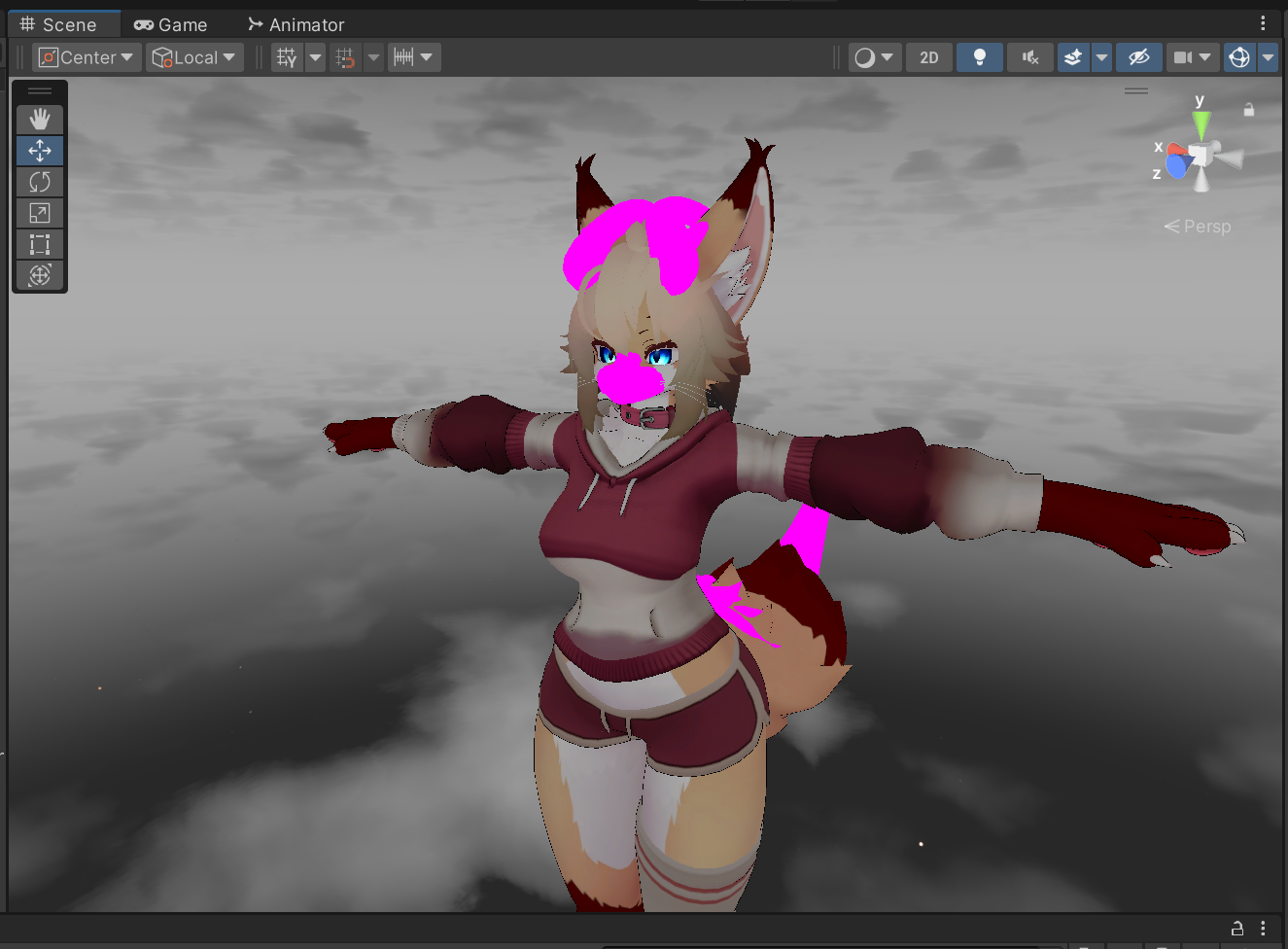
- Next step is to apply your textures to the Reyncorn meshes. [ This is compatible with custom textures ]
- Click on "Body" in your avatar root to highlight it.
- In the inspector panel, find the "Materials" tab. We'll use this to locate your body materials.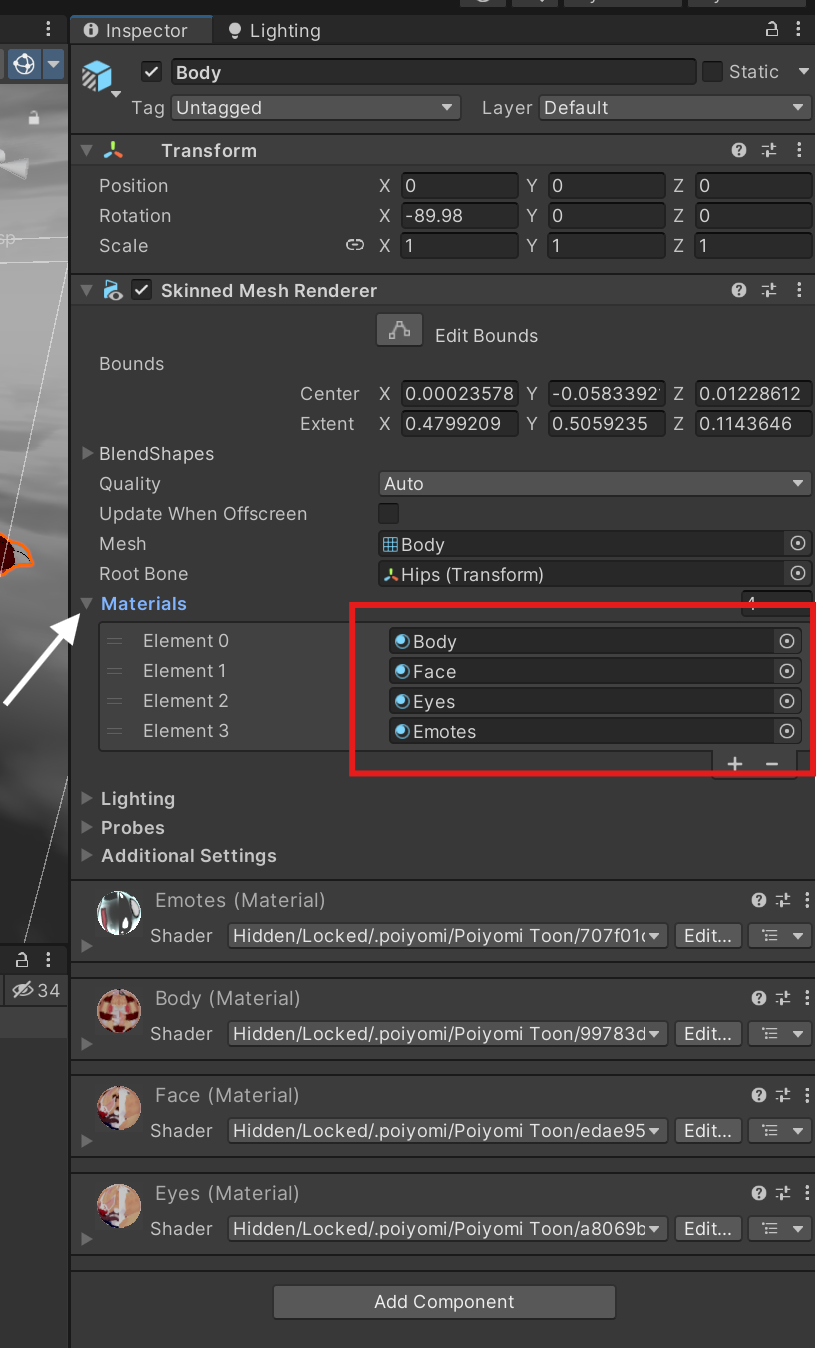 - By clicking one of the materials here, the project window will be taken to the folder containing your materials.
- Find the "Face" material and drag it to the magenta Reyncorn meshes located on the head of the avatar.
- Find the "Tail" material and drag it to the magenta tail of the Reyncorn.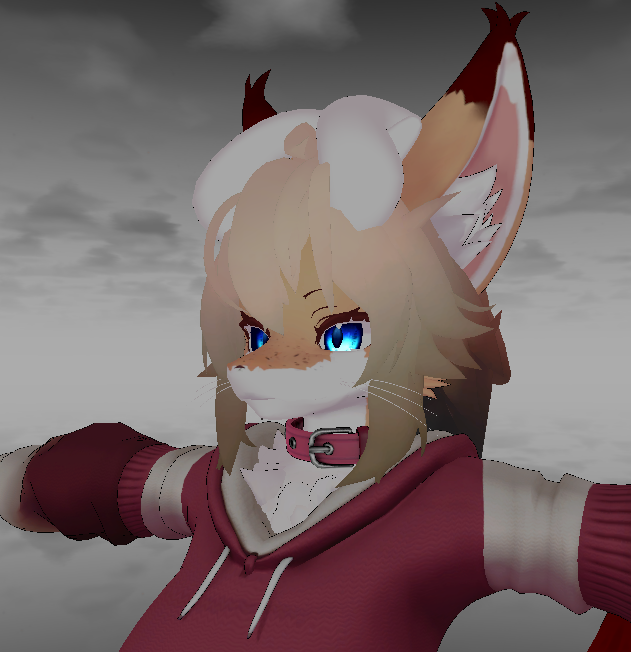
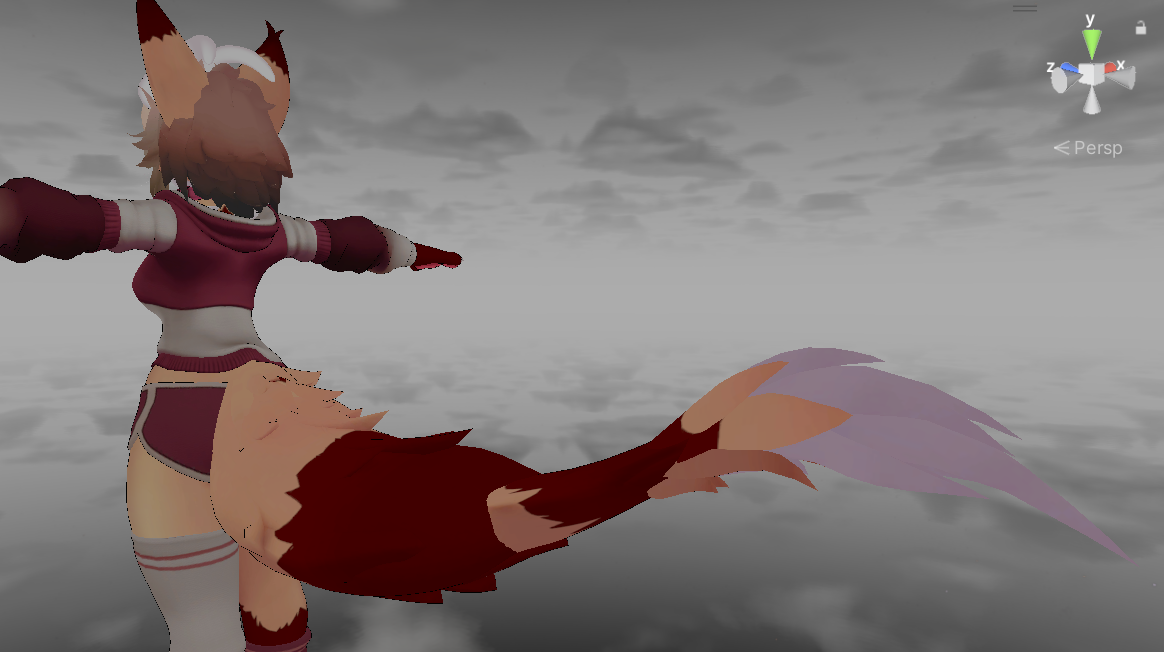 - Last we will want to delete the "Texture Variants" Animation to prevent the materials from changing on the base avatar.
- Locate the folder Assets > _zelfine > Yip > Anims - FX - Menus
- Delete the "Texture Variants" animation for your avatar version. If you're unsure you can delete all the "Texture Variants" animations [ This will disable the fur switcher in the menu ]
At this point the mod setup is complete. Color options don't sync to the body so you will need to adjust the color separately in the Kobold Edit > Color options menu
From version 1.03, a second material slot is available in "Lizard" where you should put the "Emotes" material to get blush working. The alpha may need to be adjusted. See instructions for adjusting alpha bellow.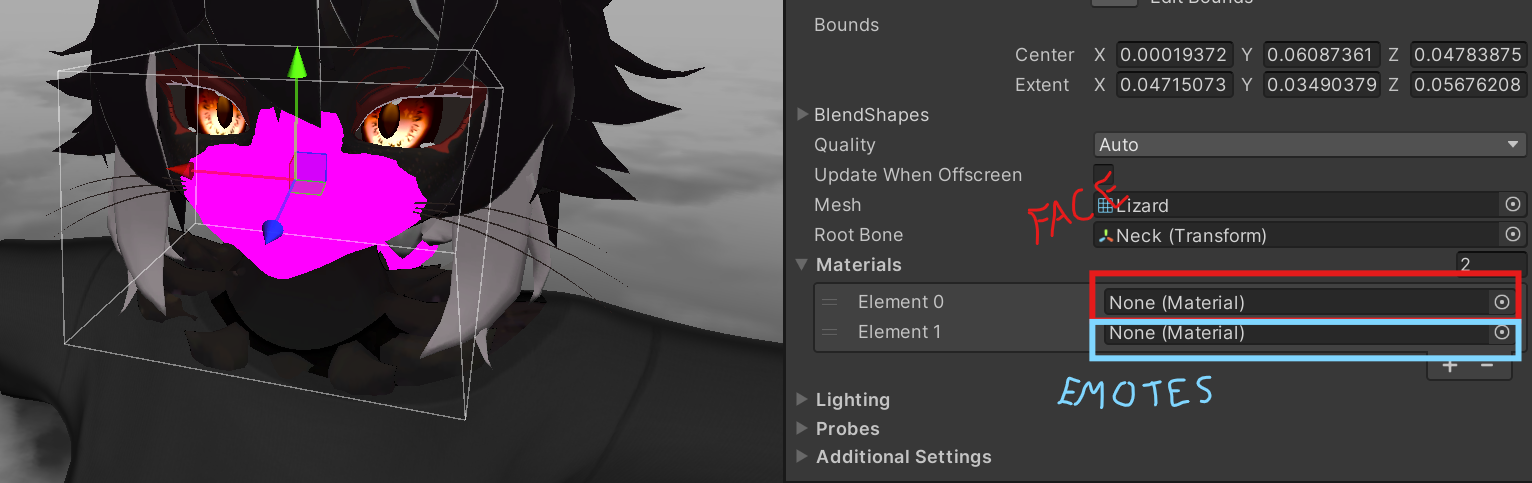
Optional Settings
Alpha :
- First create a duplicate of the face material and apply the duplicate face material to "Lizard" (the face mask).
- In the Additional Files there is an image file called "Lizard_Alpha.jpg", this can be used as the alpha map for the material you just assigned to the "Lizard" to help make the seam less noticeable.
- Set up alpha using the recommended settings bellow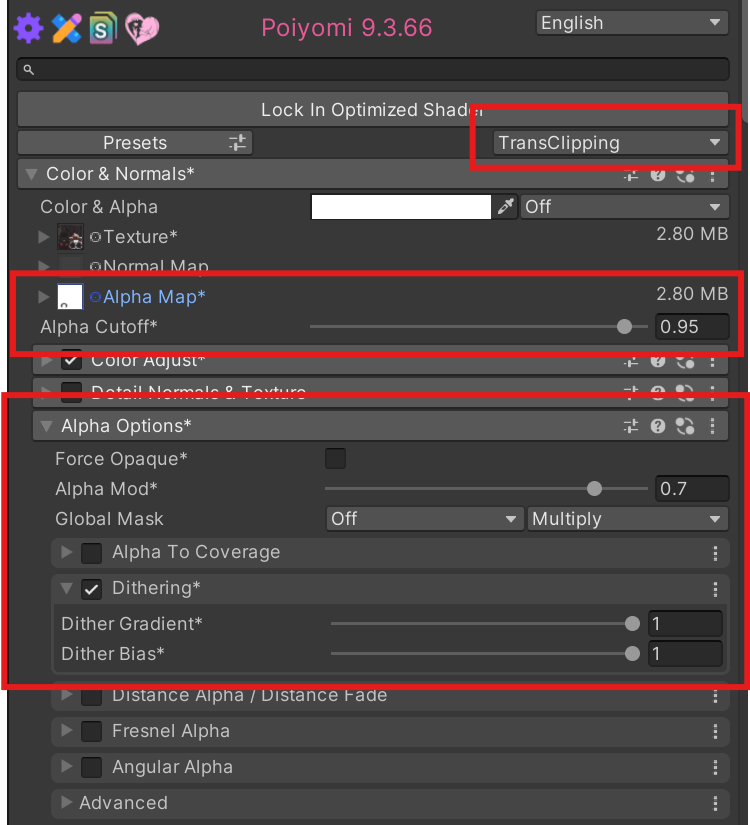 Note: Remember to change Opaque to TransClipping
Blush Alpha Adjustment [ added in version 1.03 ]:
for better blush, the Emotes material alpha should be adjusted. Bellow are recommended settings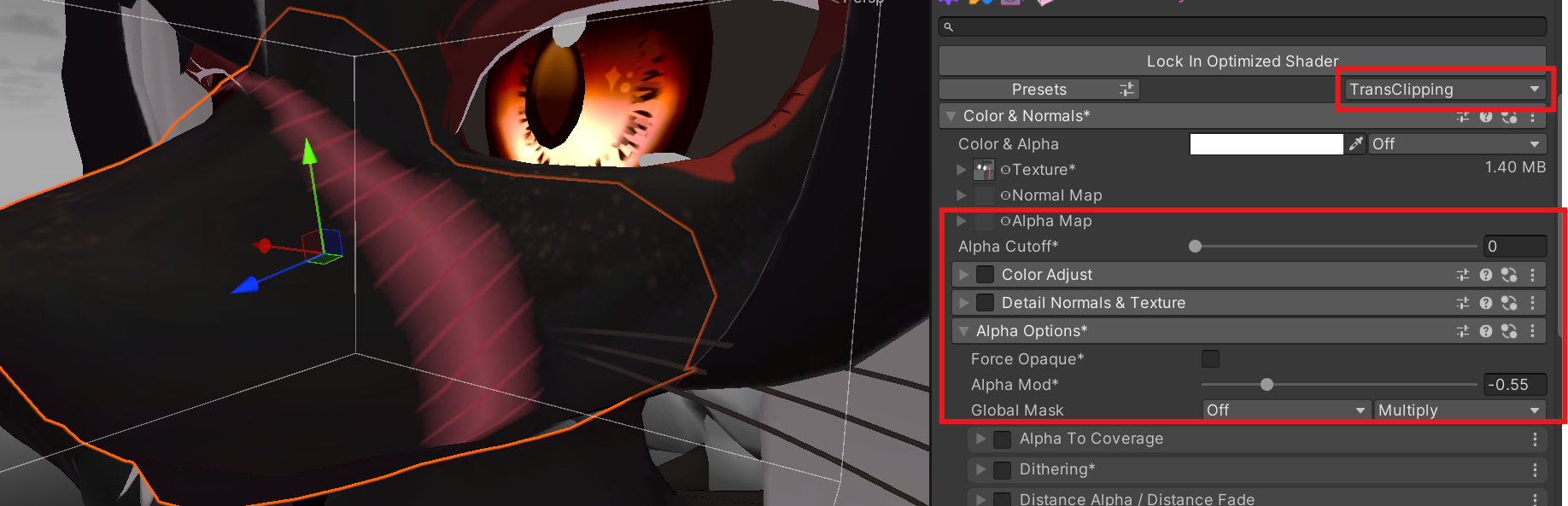
Nose Template:
- Included in Additional Files is a Nose template for converting the face texture to match the nose shape of the face mask better.
- First step is to remove the nose from your texture using your preferred method (Substance painter, Photoshop, etc..)
- Then simply layer the template on top. The template has small squares in the corners to help with alignment
Terms of Use
This asset is provided for Personal Use Only
Personal Use Only: Purchasing this Product grants you a single, non-transferable license to use the avatar/asset for personal, non-commercial purposes.
Modification: You may modify, re-texture, or edit the Product for your own use, but these Terms of Service still apply to the modified version.
Redistribute or Resell: Sharing, trading, leaking, or reselling the files (even if modified) is strictly prohibited.
Public Uploads: While this product is permitted to be used in public uploads to VRChat, please review Zelfine's TOS before uploading publicly.
Price Splitting & Group Buys: Sharing the download link or project files with friends, co-purchasing, or sharing via Discord/social groups is strictly prohibited
AI Training: Using these models or assets to train Artificial Intelligence generators or models is prohibited
If you are having any issue with using this asset or discover an error in its design, please feel free to contact me at [email protected]
I will try my best to resolve any issues as quickly as I'm able to.