
Produktbeschreibung
Dieses Produkt enthält KI-generierte Inhalte.
Take triangles and VRAM off your avatar without wrecking it.
Short description
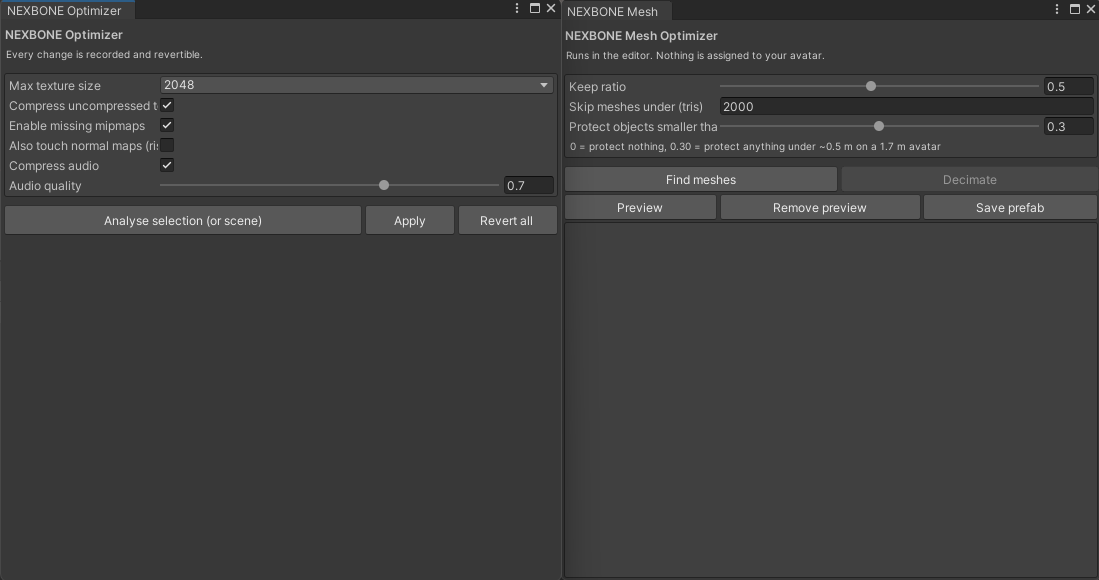
Three passes for VRChat avatars: texture compression, audio compression, and mesh decimation.
Textures and audio keep a full undo record. Decimation writes new meshes and bakes a prefab —
your scene avatar is never modified.
Measured on a real avatar
925,206 triangles, 163 textures, 304 blendshapes, 60 PhysBones. Not a test cube.
| before | after |
|---|---|---|
| Triangles | 925,206 | 728,984 (21.2% off) |
| Meshes decimated | — | 16 of 63 |
| Meshes protected | — | 47 |
| Bone weights lost | — | 0 |
| Accessories altered | — | none |
21% is the honest number when nothing is allowed to break. This is not a performance-rank
change on that avatar. Anything promising more on a 925k model is lying or hasn't looked at it.
The part that matters: it refuses to touch accessories
A watch dial is a flat textured disc, and quadric error is exactly zero on a flat surface.
That makes a dial the cheapest thing in the entire mesh to collapse — the optimiser eats it
first, and no geometric metric complains.
Most tools let you find that out afterwards. This one refuses up front: any mesh under 30% of
avatar height (~0.5 m on a 1.7 m avatar) is never decimated. Adjustable, including off. Before
you commit, the window shows exactly what will be cut and what will be kept.
Also included
- Texture pass — resolution caps, uncompressed → BC7/BC1, mipmap repair, with a
VRAM-by-cap table so the quality tradeoff is your decision
- Audio pass — Vorbis, streaming for long clips, reported as *download size* and
*runtime memory* separately, because they are not the same number
- Full undo — every texture and audio change is recorded before it happens
- Prefab output — Save prefab bakes the result to a new asset; the original stays intact
What it will not do
- It does not delete blendshapes. It reports how many look undriven and stops there, because
VRCFury and Modular Avatar generate animation at build time that a static scan cannot see.
- It does not touch hair. Hair cards are separate UV islands with no interior vertices, so
edge collapse cannot reduce them.
- It does not upload, and never contacts the VRChat API.
- It does not modify your scene avatar.
Requirements
Unity 2022.3 · VRChat SDK Avatars 3.x
Install
1. Unzip.
2. In Unity: Window → Package Manager → + → Add package from disk…
3. Select `package.json` from the unzipped folder.
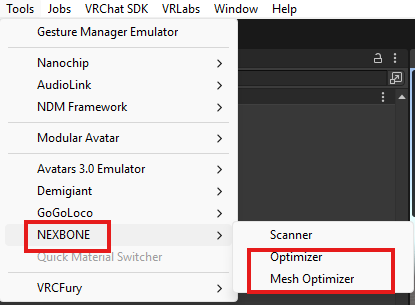
4. Open Tools → NEXBONE → Mesh Optimizer.
Important
The saved prefab references the generated meshes in `Assets/NEXBONE/Decimated/`. That folder
is a dependency, not scratch output — delete the prefab before deleting the meshes.