Laurel Wreath Halo | Touch for No.1 & Confetti | 11 Styles | VRChat · Modular Avatar
Produktbeschreibung
Dieses Produkt enthält KI-generierte Inhalte.
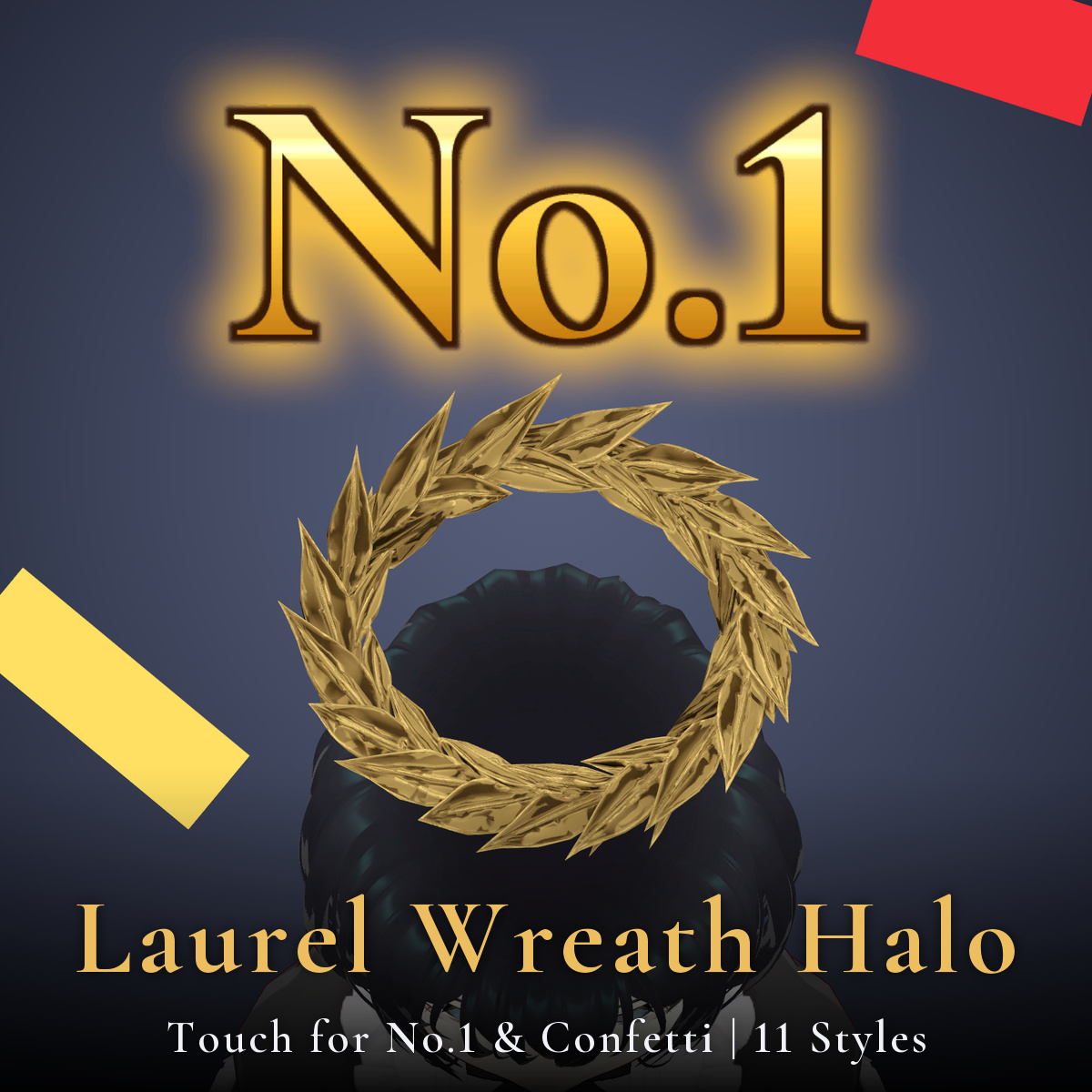
* Touch it and "No.1" and confetti burst out above your head! A VRChat halo with 11 styles, switchable from the menu
* Note: The character (avatar) shown in the product images is not included.
[Product] Laurel Wreath Halo - 11 styles
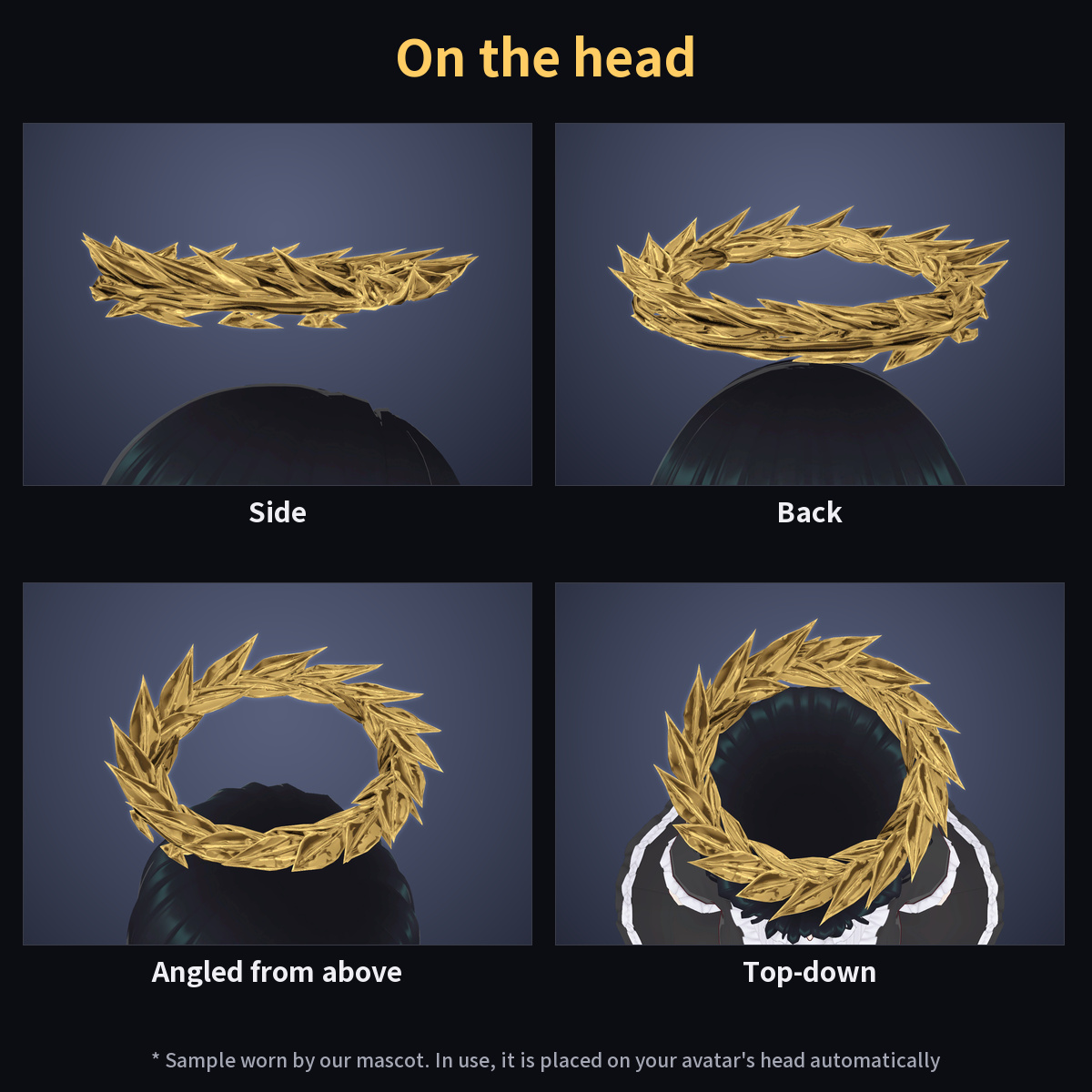
A floating halo (3D accessory) for VRChat. It supports Modular Avatar: just drop it under your avatar
and it is placed above the head automatically. A wreath of woven laurel leaves floats above your head.
* Touch it: "No.1" and confetti!
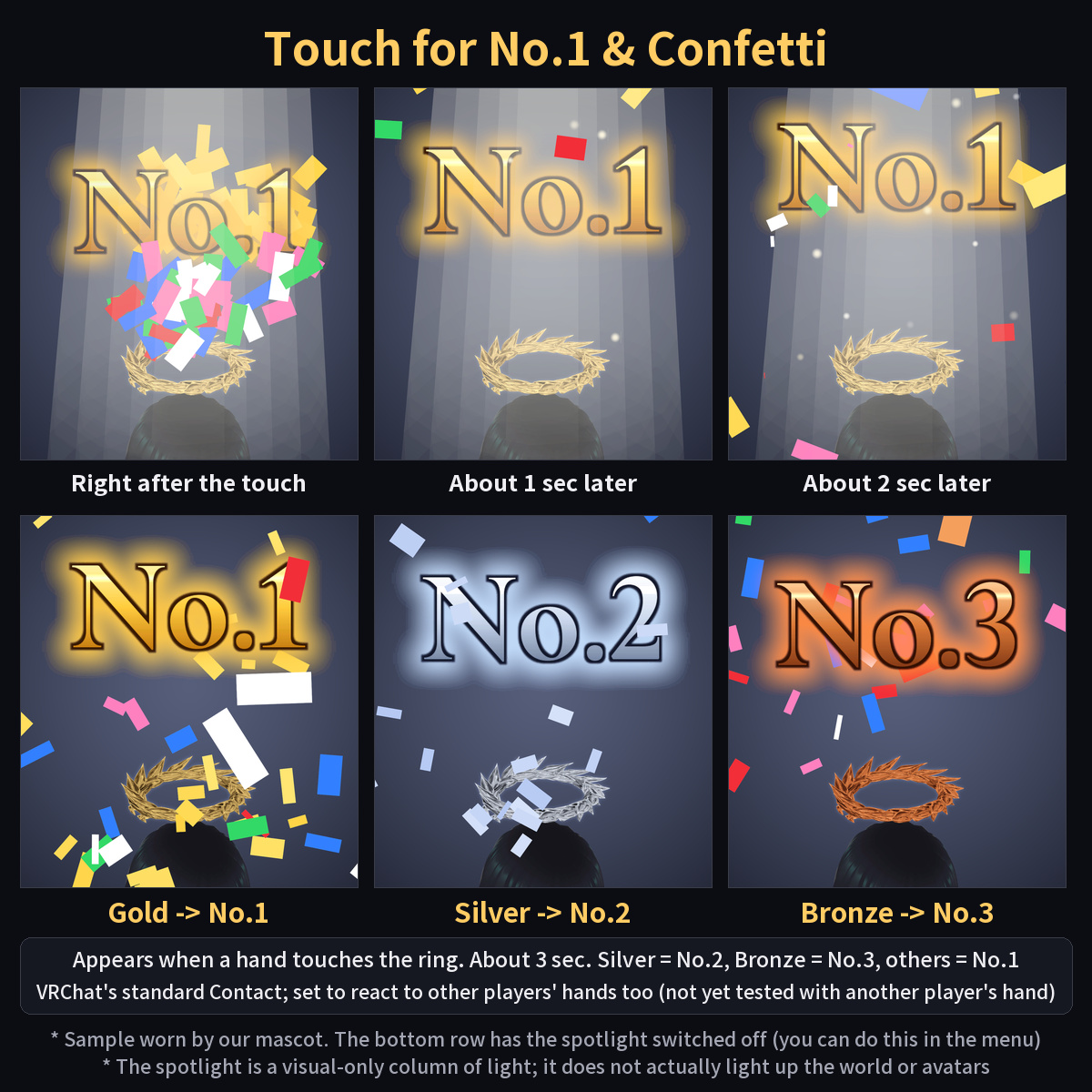
The moment a hand touches the ring, a big rank text "No.1" pops up above your head and confetti bursts out.
A visual-only spotlight (a column of light) also appears from above. Silver shows "No.2" and Bronze shows "No.3". An all-in-one prefab lets you switch between all 11 styles from the menu.
It uses VRChat's standard Contact and is set up to react to other players' hands too (not yet tested with another player's hand).
* Features
- Touch it and a big rank text "No.1" appears above your head while confetti bursts out (Silver shows "No.2", Bronze shows "No.3", every other style shows "No.1". The text is readable from any direction)
- At the same time a spotlight (a visual-only column of light, not a real light) fades in from above; it does not actually light up other players, avatars or the world
- The effect lasts about 3 seconds and then rests for a moment. You can switch "Effects" and "Spotlight" separately in the menu
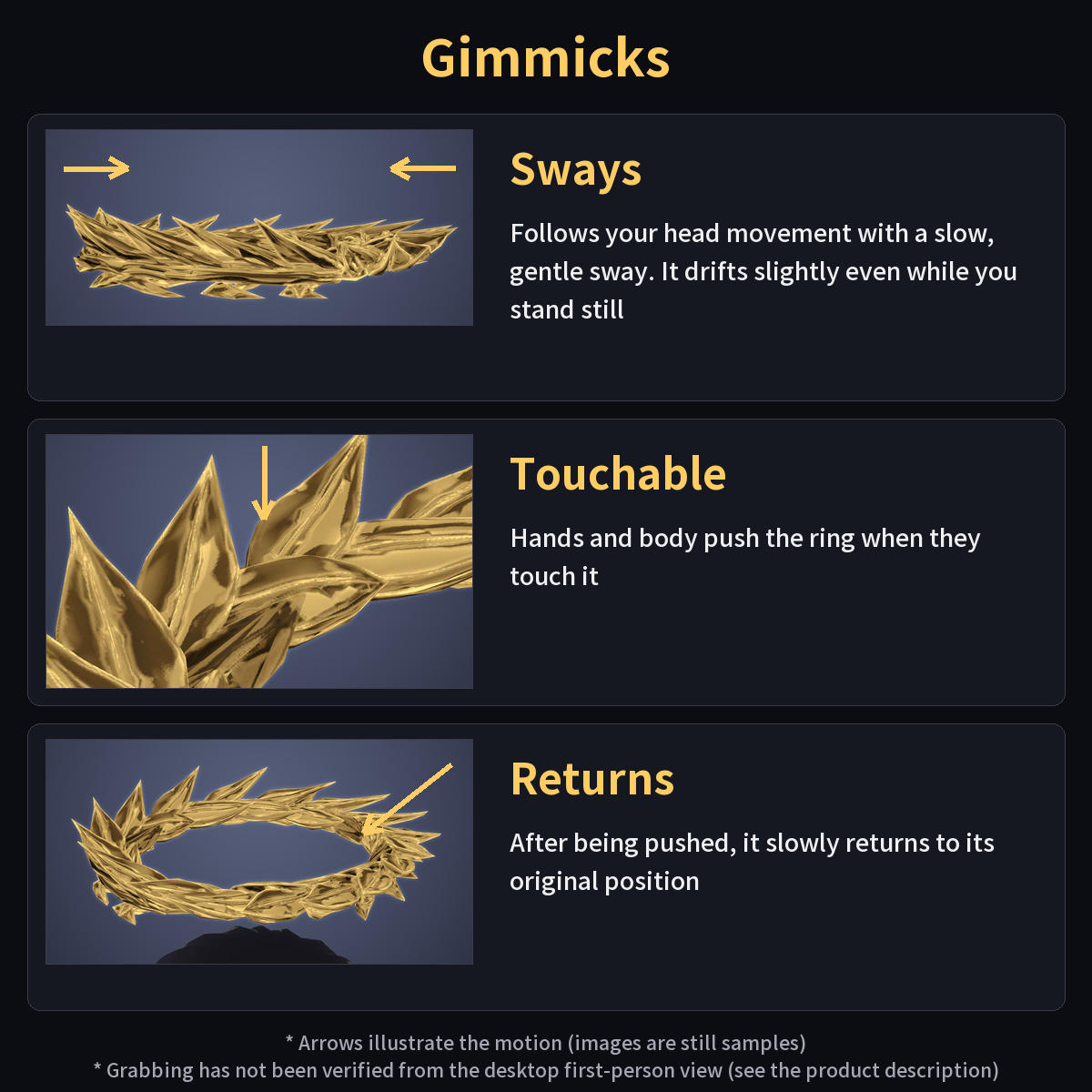
- Follows your head movement with a slow, gentle sway. It also drifts slightly while you stand still
- Touching the halo pushes it and makes it sway. Grabbing has not been verified from the desktop first-person view (not yet tested in VR or with another player's hand).
- After being pushed, it slowly returns to its original position
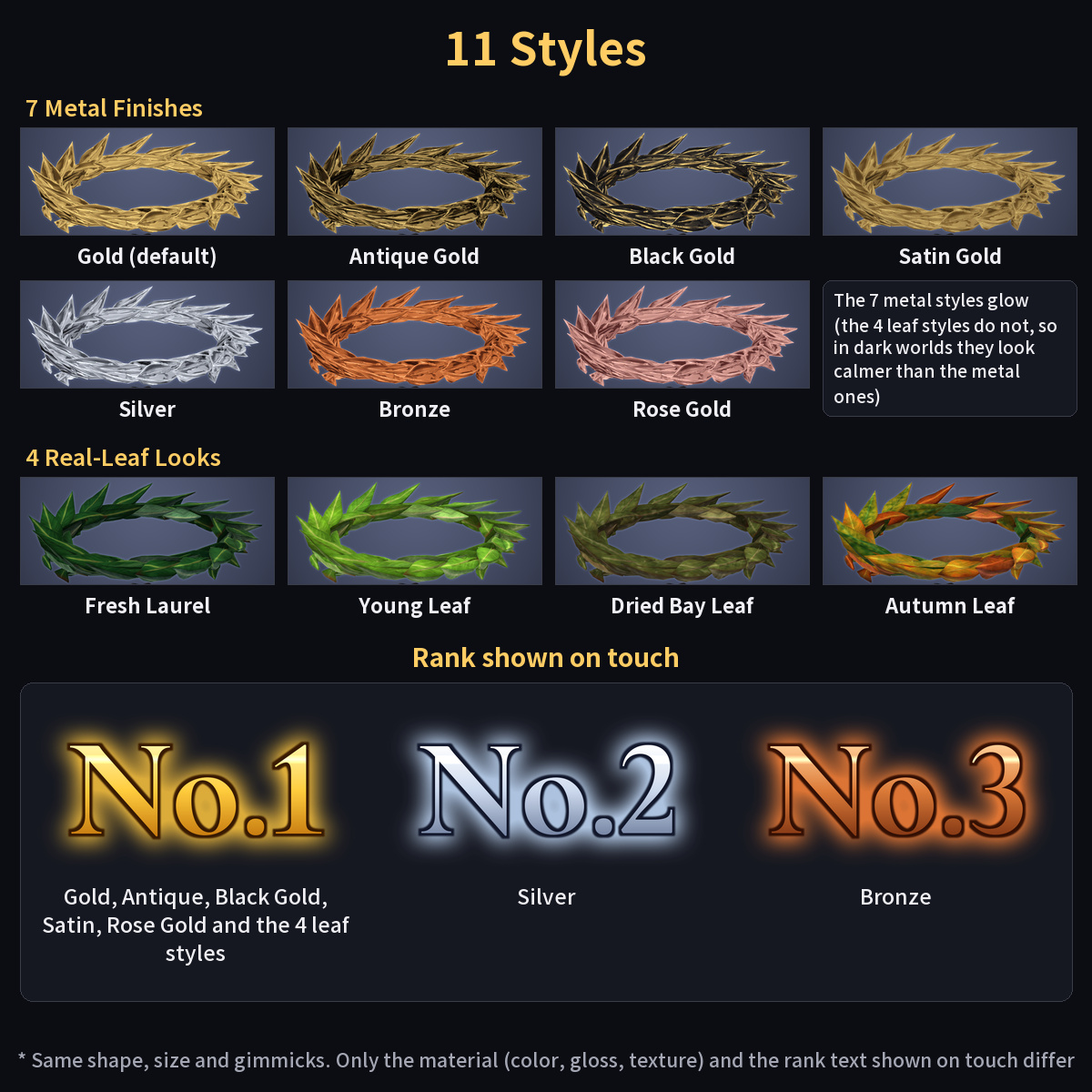
- 11 styles with different looks:
7 metal finishes (Gold, Antique Gold, Black Gold, Satin Gold, Silver, Bronze, Rose Gold) + 4 real-leaf looks (Fresh Laurel, Young Leaf, Dried Bay Leaf, Autumn Leaf)
- Includes an all-in-one prefab (Halo_laurel_all) that switches between the 11 styles from the menu, plus 11 lightweight single-style prefabs
- The 4 leaf styles do not glow, so in dark worlds they look calmer than the metal ones (the leaf texture shows best in bright places)
* What's included
- Halo_laurel.unitypackage ... Standard version (2048px textures). 1 all-in-one prefab + 11 single-style prefabs
- 軽量版_Light_1024px/Halo_laurel_light.unitypackage ... Light version (1024px textures). Same contents and prefabs as the standard version; only the color and normal textures are imported at 1024px
(for those who want to save texture memory. The difference in how the ring looks from a normal distance is very small. You do not need both: import just one of them)
- Read Me (Japanese and English) / Terms of Use (Japanese and English) / Changelog
* Included prefabs
Recommended (switch between the 11 styles from the menu)
- Halo_laurel_all ... All-in-one. Put just this one under your avatar and choose any of the 11 styles from the "Color" menu (default: Gold)
Single-style prefabs, lighter (place just one of them under your avatar; no color menu)
- Halo_laurel ... Gold (shows No.1 when touched)
- Halo_laurel_antique ... Antique Gold (recesses sink into dark brown; only the edges and strong highlights stay gold)
- Halo_laurel_blackgold ... Black Gold (black body; only edges and strong highlights are gold)
- Halo_laurel_satin ... Satin Gold (a matte, fine-grained gold with reduced gloss)
- Halo_laurel_silver ... Silver (shows No.2 when touched)
- Halo_laurel_bronze ... Bronze (reddish brown to copper; shows No.3 when touched)
- Halo_laurel_rose ... Rose Gold
[Real-leaf looks]
- Halo_laurel_leaf ... Fresh Laurel (deep green leaves, light yellow-green midribs, a soft gloss on the top side)
- Halo_laurel_leaf_young ... Young Leaf (bright yellow-green leaves)
- Halo_laurel_leaf_dried ... Dried Bay Leaf (dull olive, no gloss, edges dried to brown)
- Halo_laurel_leaf_autumn ... Autumn Leaf (green, yellow, orange and red-brown mixed from leaf to leaf)
Note: the all-in-one prefab and the 11 single-style prefabs share the same shape, size and gimmicks. Only the material (color, gloss, texture) and the rank text shown on touch differ.
Do not place Halo_laurel_all together with any other Laurel prefab (the parameter names would collide). Use just one.
* Colors and ranks (the text and the confetti color shown on touch)
- Silver -> No.2 (silver text, silver-tinted confetti)
- Bronze -> No.3 (bronze text, bronze-tinted confetti)
- Everything else (Gold, Antique Gold, Black Gold, Satin Gold, Rose Gold and the 4 leaf styles) -> No.1 (gold text, gold-tinted confetti)
- When you switch the color in the all-in-one prefab, the ring material, the rank text and the confetti color switch together
* Requirements
- Unity 2022.3
- VRChat SDK Avatars 3.10 or later
- Modular Avatar 1.18 or later (required)
- lilToon 2.3 or later (required)
* How to install
1. Install Modular Avatar and lilToon (you can add them from VCC)
2. If you used an earlier Laurel Halo, delete the Assets/ys-room_Halo/Halo_laurel/ folder first, then import
(importing over it also works, but old files may remain. Do not touch the folders of other halos)
3. Import ONE of the two packages into Unity: Halo_laurel.unitypackage (standard) or Halo_laurel_light.unitypackage in the folder "軽量版_Light_1024px" (light)
(when you swap between standard and light, delete Assets/ys-room_Halo/Halo_laurel/ before importing)
4. Drag and drop Assets/ys-room_Halo/Halo_laurel/Halo_laurel_all.prefab (recommended), or the single-style prefab you like, under your avatar (Modular Avatar places it on the head automatically)
5. Operate it from the VRChat Action Menu
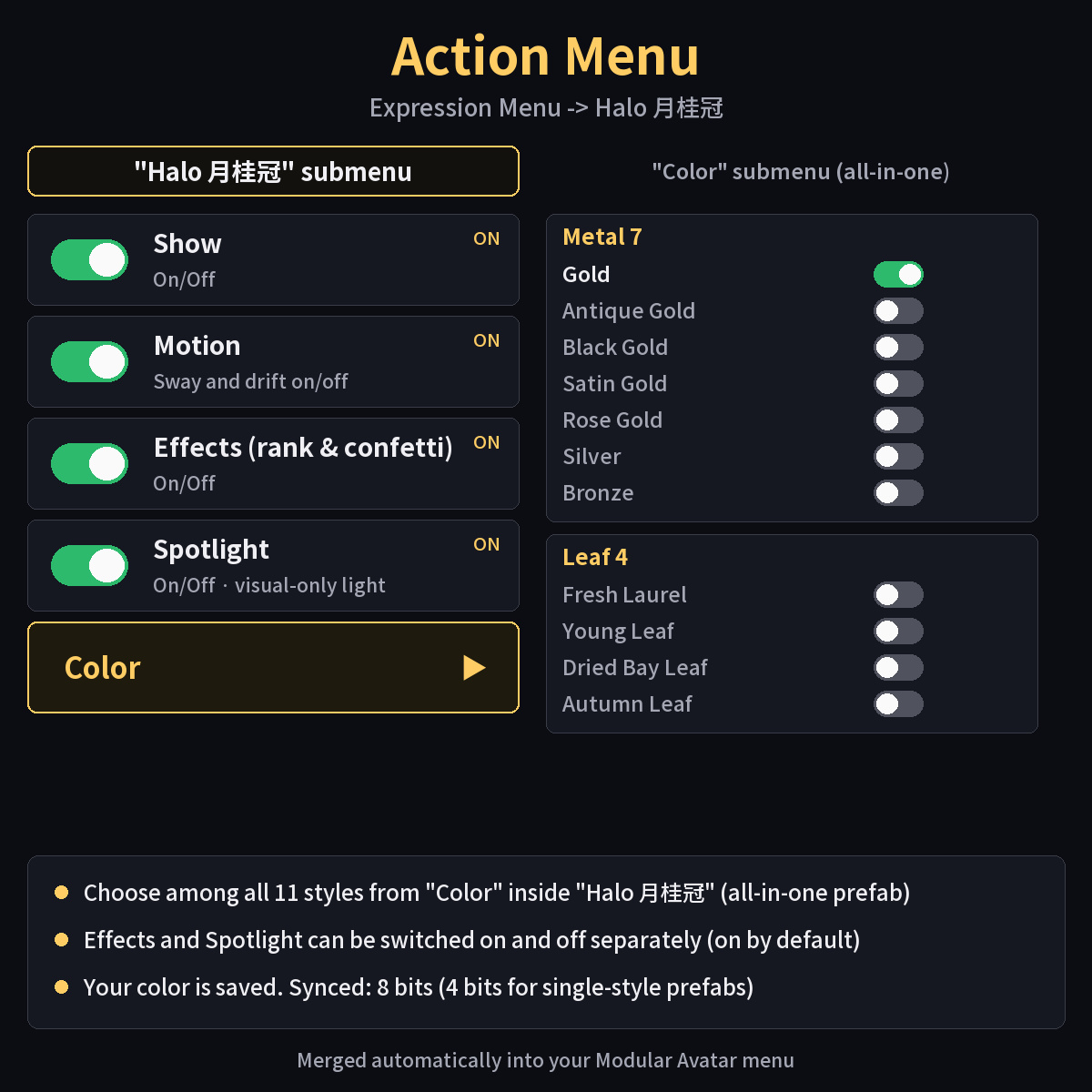
* Menu layout (VRChat Action Menu)
"Halo 月桂冠"
- Show (on/off)
- Motion (on/off) ... sway and drift
- Effects (rank and confetti) (on/off)
- Spotlight (on/off)
- Color * all-in-one (Halo_laurel_all) only
- Metal ... Gold / Antique Gold / Black Gold / Satin Gold / Rose Gold / Silver / Bronze
- Leaf ... Fresh Laurel / Young Leaf / Dried Bay Leaf / Autumn Leaf
- Show, Motion, Effects and Spotlight are all on by default. "Effects" and "Spotlight" can be switched on and off separately
- The toggle of the style you have selected shows as on. Selecting another one turns the previous one off
- Pressing the selected style's toggle again (turning it off) returns to Gold (by design)
- The selected color is saved (it stays when you change worlds with the same avatar)
- The menu has at most 7 items per page (within 8). The single-style prefabs have no "Color" menu
* How it was made
- Generative AI was used. Shape: the base form was generated by an image-to-3D AI and then reworked and optimized by us. Textures: made procedurally by us; no image-generation AI was used for them. The rank text, confetti, light column and menu are also made by us
* Performance (measured)
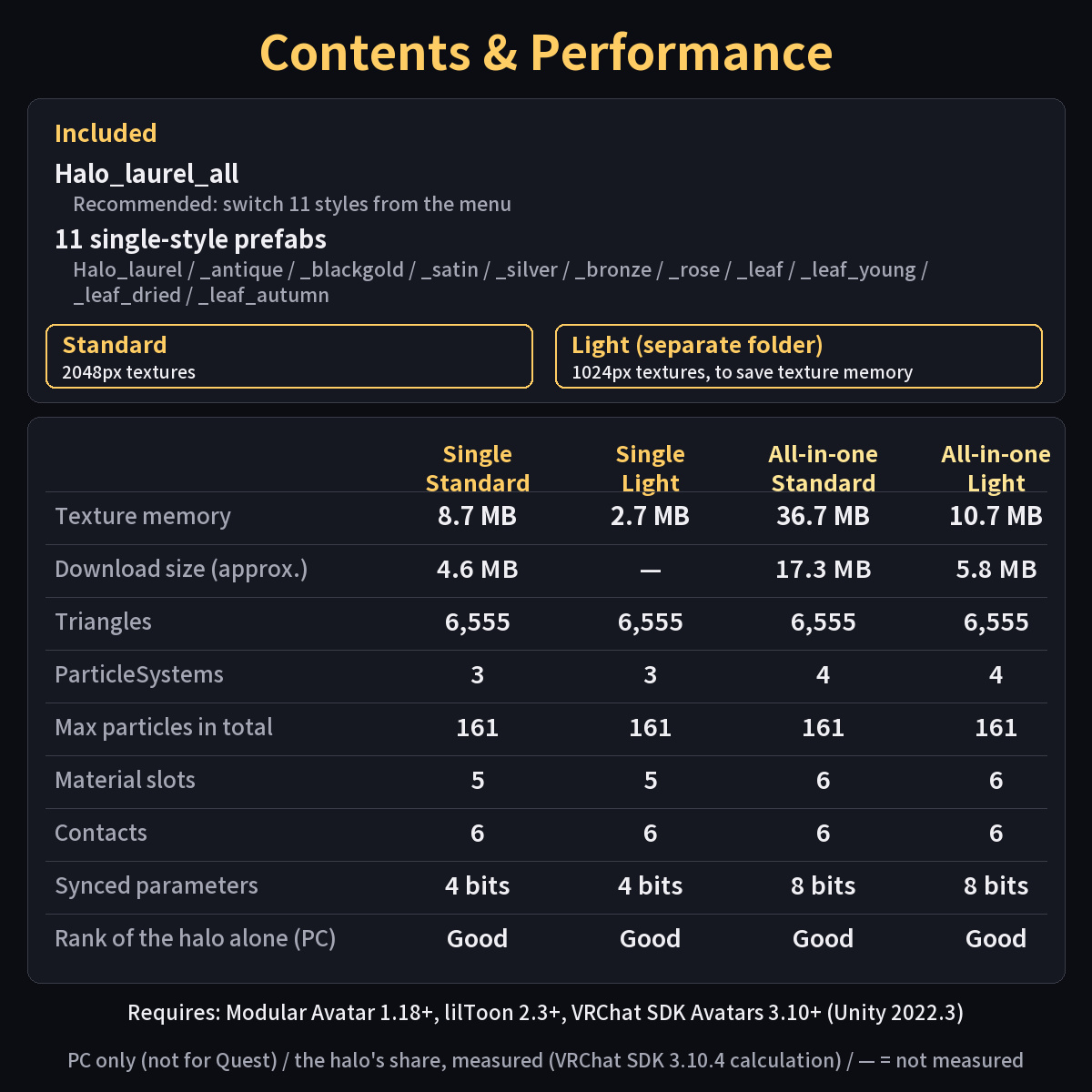
Measured with the VRChat SDK 3.10.4 performance calculation on an avatar baked by Modular Avatar etc. The PC limits are VRChat's official thresholds.
Single-style prefab All-in-one (Halo_laurel_all)
- Triangles (halo) 6,555 (ring 5,955 + light column 600) same
- Material slots (halo alone) 5 6
- ParticleSystems 3 4 (within the PC "Good" limit of 4)
- Max particles in total 161 161 (no mesh particles, no Light)
- Contacts (hand receivers) 6 6
- PhysBones 1 / animated transforms 7 / PhysBone colliders 1
- Synced parameters 4 bits 8 bits (+4 bits for the color switch)
- Performance rank (PC, halo alone): Good for both (not Excellent, because it uses particles)
Texture memory (the halo's share)
Standard (2048px) Light (1024px)
- Single-style prefab about 8.7 MB about 2.7 MB
- All-in-one (switch 11 styles) about 36.7 MB about 10.7 MB
- Download size (halo's share) single about 4.6 MB / all-in-one about 17.3 MB all-in-one about 5.8 MB
* The all-in-one adds the textures for all 11 switchable styles to your avatar (only the style you choose is displayed).
* On our test avatar as a whole, texture memory went from 27.4 MB -> 36.1 MB with a single-style prefab (Excellent) -> about 64.1 MB with the all-in-one (Good) ->
about 38.1 MB with the light all-in-one (Excellent). The overall rank differs by avatar (if your avatar itself is already heavy, it may stay Poor / VeryPoor either way).
* For the all-in-one, the texture memory counts every material the menu can switch to. VRChat's own display may count differently.
* For desktop PC use, many people will find the standard version fine; if the weight of your whole avatar matters, choose the light version or a single-style prefab.
* The light version differs very little: at about 1 m the average pixel difference of the ring is 0.1-0.9 out of 255, and even at about 33 cm it is 0.4-4.9; side by side it is almost impossible to tell apart.
* Notes
- PC only. It does not work on standalone Quest (it uses lilToon and particles, which are not supported there)
- The effect is triggered when VRChat's standard hand/finger Contact touches the ring. It is set up to react to other players' hands too (not yet tested with another player's hand). Moving your hands near the ring may trigger it by accident (switch "Effects" and "Spotlight" off in the menu if you do not want that)
- The light column is a semi-transparent visual only; it does not actually light up anything around it or other avatars. It is hardly visible in bright worlds (it looks best in dark worlds)
- The 4 leaf styles do not glow, so in dark worlds they look calmer than the metal ones
- The Action Menu is merged automatically into your Modular Avatar menu. If you already use many menu items,
please check how much menu space is left (synced parameters: 4 bits for a single-style prefab, 8 bits for the all-in-one)
- Right after you switch the color in the all-in-one, a different color may flash for a moment (the color is sent through 4 synced parameters)
* Terms of Use (summary)
- You may modify it freely
- Redistribution of this product is prohibited (original or modified; distributing or selling avatar data that contains it is also prohibited)
- You may include it in your own avatar and upload it to VRChat
- Please read the included Terms of Use for details
* Changelog
- 2026-10-13: First release (11 styles, rank text and confetti on touch, spotlight, all-in-one prefab)
* Video
- See the motion in the YouTube video: https://youtu.be/1Vm5TIWNQaQ
- - - - - -
* More products by ys-room
- Shop: https://ys-room.booth.pm/