BunBunShippo – Wag Your Tail Like an Excited Puppy! 【VRChat / PC & Android Tested】
Produktbeschreibung
Dieses Produkt enthält KI-generierte Inhalte.
BunBunShippo v1.0.0
🐾 Wag your tail like an excited puppy!
Bring your VRChat avatar to life with energetic and adorable tail-wagging animations!
BunBunShippo is an easy-to-use Unity tool that adds expressive tail movements to your existing avatar.
Tested on both VRChat PC and Android!
━━━━━━━━━━━━━━━━━━
🐾 Features
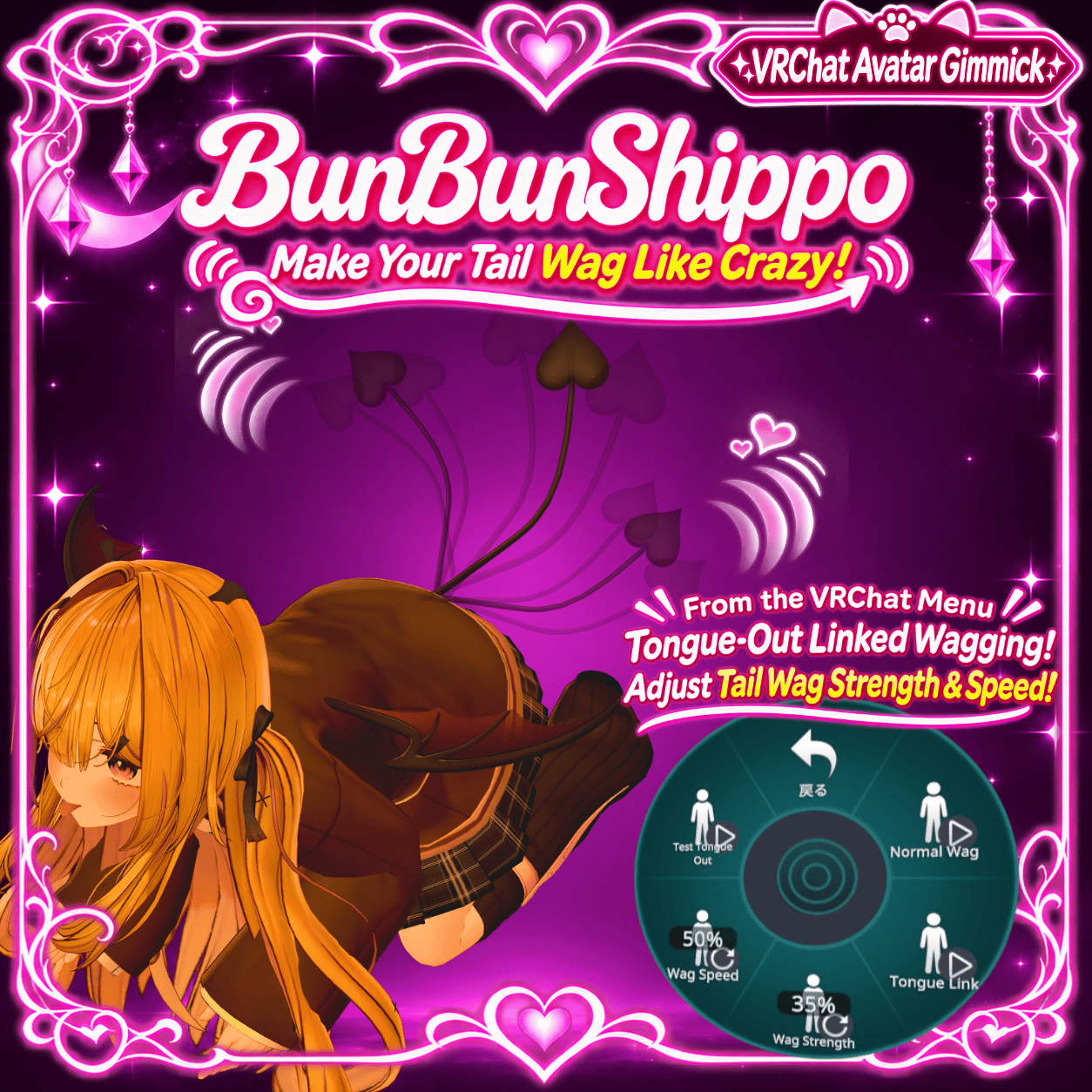
① Wag Your Tail!
Wag your tail whenever you want!
Turn tail wagging ON or OFF and adjust the wagging intensity and speed directly inside VRChat.
② Stick Out Your Tongue and Wag Your Tail!
Link tail wagging to your avatar's tongue-out expression.
Your tail can automatically start wagging whenever you activate your registered tongue-out expression!
③ Create a Test Tongue-Out Toggle!
If your avatar has a suitable tongue-out blendshape (shape key), you can create an Expressions menu toggle to stick out and retract your tongue.
The generated tongue-out control is automatically registered for tail-wagging integration.
Simply enable tongue-out linking inside VRChat to make your tail wag along with your tongue-out expression!
Compatible blendshapes and settings are required. This feature may not be available for every avatar.
④ Easy Unity Setup!
Simply select your avatar and tail, then configure your settings!
You can preview the tail movement directly inside Unity before applying it to your avatar.
━━━━━━━━━━━━━━━━━━
📦 Requirements
- Unity 2022.3.22f1
- VRChat SDK (tested with 3.10.6)
- Modular Avatar (tested with 1.18.7)
- A VRChat avatar with movable tail bones
Modular Avatar is required.
- Tongue-out linking requires a compatible tongue-out control.
- Creating a test tongue-out toggle requires a suitable tongue-out blendshape.
━━━━━━━━━━━━━━━━━━
🔧 Installation
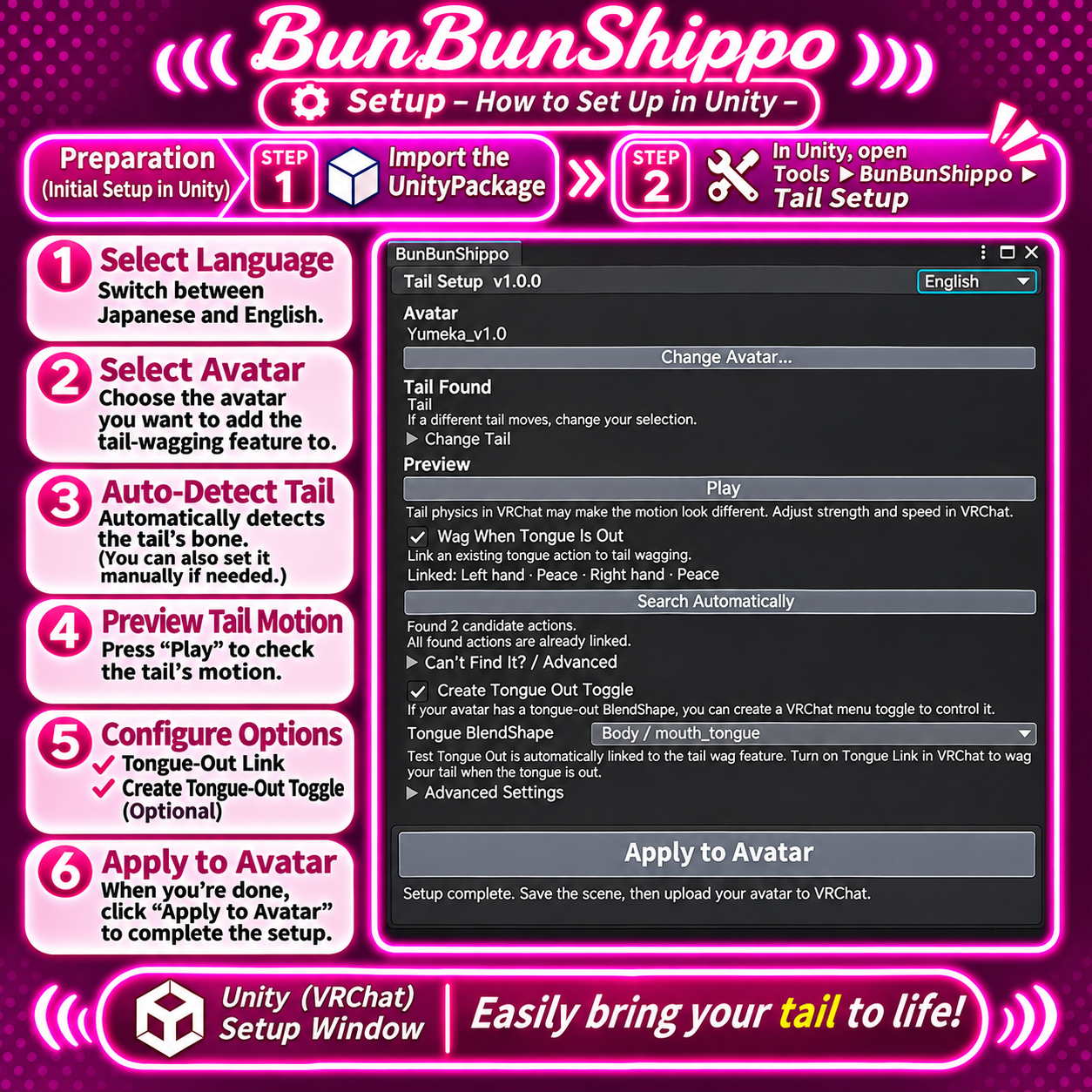
- Extract the ZIP file and import the unitypackage into Unity.
- Open Tools → BunBunShippo → Tail Setup.
- Select your avatar and tail.
- Preview and adjust the tail movement.
- Apply the settings to your avatar.
- Upload your avatar to VRChat. You're ready to go!
You can toggle tail wagging and adjust its intensity and speed directly from the VRChat Expressions menu.
Tongue-out linking and test tongue-out controls are completely optional. Configure them only if you want to use them!
The setup interface supports both English and Japanese.
━━━━━━━━━━━━━━━━━━
💻 Compatibility
Tested on:
- VRChat PC
- VRChat Android
Compatibility with every avatar and environment is not guaranteed.
For Android use, your avatar must also be compatible with VRChat Android.
━━━━━━━━━━━━━━━━━━
⚠️ Important Notes
- Avatar, tail, and tongue models are not included.
- Compatibility may vary depending on your avatar's structure and existing gimmicks.
- PhysBone behavior and FX Avatar Mask settings may affect tail movement.
- This tool does not create tongue-out blendshapes themselves.
━━━━━━━━━━━━━━━━━━
📁 What's Included
- BunBunShippo_v1.0.0.unitypackage
- README.txt (English / Japanese)
- LICENSE.txt (English / Japanese)
━━━━━━━━━━━━━━━━━━
📜 Terms of Use
Allowed:
- Personal use
- Commercial use
- Video creation and livestreaming
- Monetized content
- Modification by the original purchaser
Not Allowed:
- Claiming the product as your own creation
- Redistribution
- Reselling
Please refer to the included LICENSE.txt for the full terms of use.
━━━━━━━━━━━━━━━━━━
🤖 Generative AI Disclosure
Generative AI was used to assist with software development, coding, and promotional image creation.
The final product was reviewed, adjusted, and tested by the creator.
━━━━━━━━━━━━━━━━━━
💬 Support
If you have any questions or encounter any issues, please contact Roo's Workshop through Jinxxy.
Thank you for your support, and happy tail wagging!
Roo's Workshop