
Produktbeschreibung
Dieses Produkt enthält KI-generierte Inhalte.
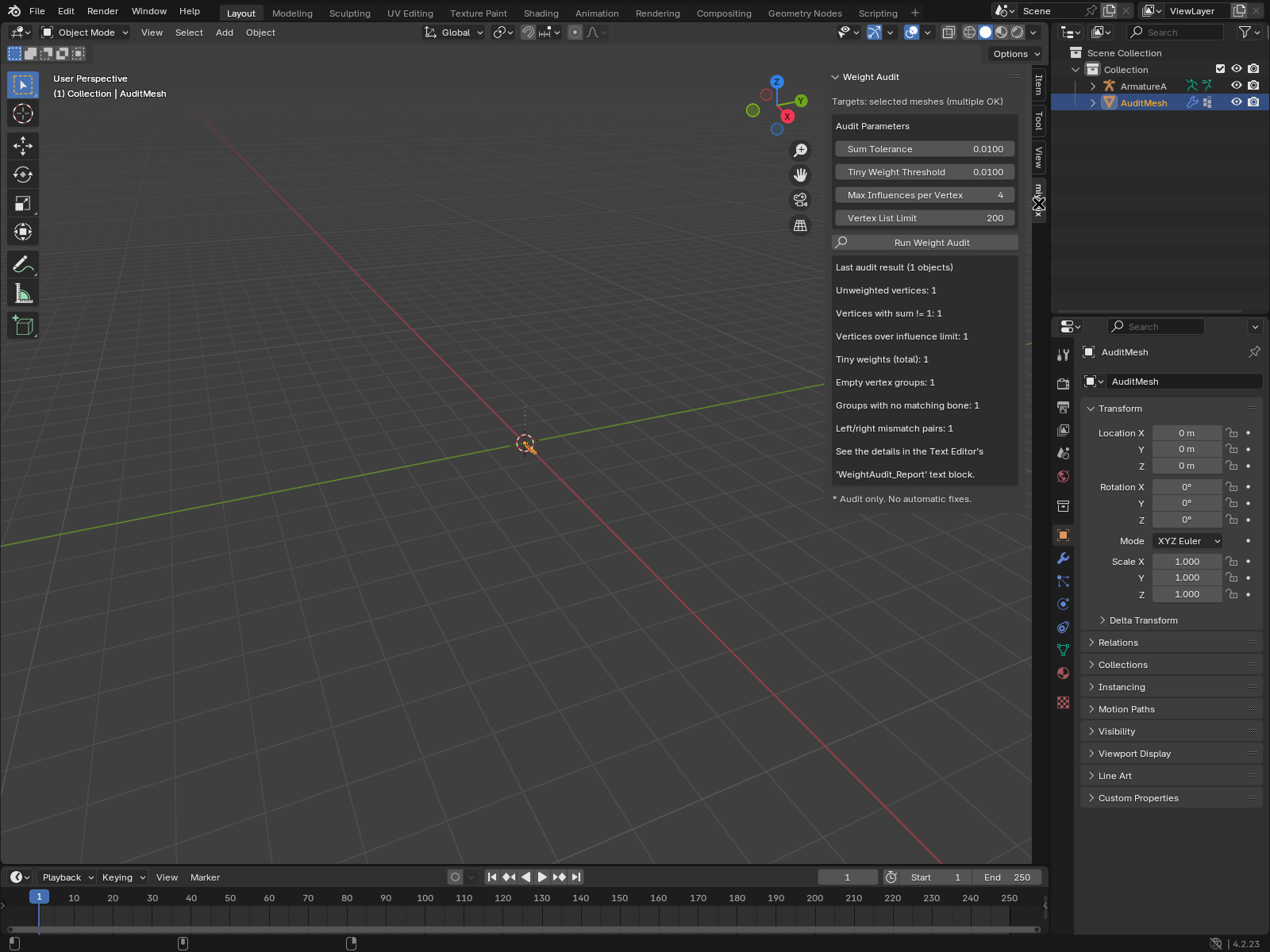
Your avatar looks fine standing still. Then it moves — and a vertex stays behind. Or folds the wrong way. Or both. That is the weight you missed. Weight Audit Checker audits the weight health of the selected meshes and lists the "wrong" spots, numerically, in a single report — BEFORE they break in a pose. Scan. Read the report. See the numbers. Blender 4.2 or 5.3. $9.99. What it checks Unweighted vertices — vertices with a weight sum of 0, listed by vertex index (up to the list limit; the total count is always printed) Weight sum != 1 — vertices whose weight sum differs from 1.0 by more than the tolerance (default 0.01), with the sum values shown Too many influence groups — vertices with more influence groups than the limit (default 4) per vertex Tiny weights — the total count of weights below the threshold (default 0.01), counted per vertex x group entry Empty vertex groups / groups with no matching bone — groups with 0 assigned vertices, and groups that do not correspond to a bone of the armature (when an Armature modifier is present) Left/right symmetry check — builds pairs from side notation in vertex group names (.L/.R etc.), and compares assigned vertex counts and weight sums Results are written to the "WeightAudit_Report" text block, with a summary shown in the panel. How to use Select the mesh objects you want to audit (multiple are allowed; non-mesh objects are excluded automatically). Open the "miyabix" tab in the 3D Viewport sidebar (N key). Adjust the parameters if needed: Sum Tolerance (default 0.01), Tiny Weight Threshold (default 0.01), Max Influences per Vertex (default 4), Vertex List Limit (the maximum number of vertex indices listed). Press "Run Weight Audit". Read the summary counts in the panel and the details in the "WeightAudit_Report" text block. Notes and limitations This addon only audits and reports. It does not modify weights automatically: it does not normalize weights, remove tiny weights, or clean up groups. The report shows where the problem is and what kind it is. This differs from Outfit Fit Checker (Product 19): it does not look at shape key follow or penetration; it only checks the health of the weights themselves (sums, influence counts, symmetry). Left/right symmetry: groups with custom names that have no side notation are not checked. The check compares assigned vertex counts and weight sums; it does not guarantee full per-vertex symmetry. Works fully offline. No external libraries are used (only Blender's standard bpy and Python's difflib). Installation Start Blender 4.2 or 5.3. Install the .py file via Preferences > Add-ons > Install... and select the .py file, then enable the addon by checking its checkbox. A "miyabix" tab is added to the 3D Viewport sidebar (N key). System requirements Blender 4.2 or 5.3 (Windows / macOS / Linux — any environment where Blender runs) Files included weight_audit_checker.py — the addon README.txt — full English instructions Refund policy For defects such as the addon failing to start, please contact the shop within 5 days of purchase with a detailed description of your operating conditions (Blender version, object structure, error messages, etc.). We will review the details and respond. Refunds cannot be accepted for requests outside the scope of use, or for behavior that matches the specifications.